Now that my group is finished with filming I started to edit. My group decided on an editing software. This did not take long since each group member has a little bit of experience with editing software due to previous projects. I shortly visited the idea of some free services that would allow me to mainly use my laptop. However, after entertaining the idea in a group discussion, I then decided against it because it would limit the overall ability of my group to move clips and sounds across platforms. Instead I decided it would be the best choice to use iMovie as my groups editing software for this film. This is because all group members are able to use it and I have a little bit of past experience using the software. Before I started to edit, my group members and I gathered all of the scenes filmed into one folder. I was able to do this pretty easily because my group members sent the already filmed scenes into a group chat I made through iMessage. To make moving the clips into iMovie ...
For the final task I am working in a group of four. The group I am in has Jake, Kyle, Kaden, and I. We all share the same class period. So far I have only worked on projects in this class with Jake. We have worked on 3 other projects than this one. However, this project will be the first time either of us work in a whole group for this class. During the last projects we have worked on, Jake and I worked as a group of two. Due to this, the productivity and quality of our film should be better than the ones I have worked on in the past. Now that we have a larger group we have much more options. For example, there can be a designated camera operator, or even that we swap around a camera and use the entire group inside the film. Also Kyle and Kaden have worked on the same projects we have, but separately from us. This means we all have at least relatively the same amount of experience. This is beneficial to all of us because we won't have to take much time to adjust to working together...
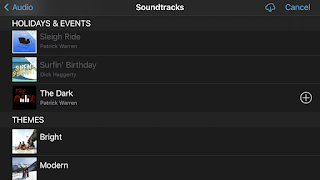
When it came to choosing music and sound effects my group decided it would be best to either use YouTube or iMovie. Though I could have tried get permission to use music that is usually copyrighted, my group decided against this because it would likely take a long wait. Also, the music my group needed for the clips was very find. After deciding on this my group then chose between YouTube and iMovie to use music from. YouTube has a large array of copyright free music. However, the music, jingles, and sound effects are included with iMovie on a royalty free basis. Also, it is much more efficient to use the iMovie option especially because my group is using iMovie to edit. Due to this my group decided to go with the iMovie option. I then spent a while looking through all of the music options iMovie provides. There are many choices but I was specifically looking for music that had a somewhat suspenseful feeling to it. Though my genre is sci-fi, my group was trying to give a suspenseful moo...

Comments
Post a Comment